
Solar Battery Terminal Corrosion: Causes and How to Clean It

How do you clean solar battery terminal corrosion? Switch the inverter off, disconnect the negative cable first, then the positive, and scrub the terminals and clamps with a baking soda and water solution until the metal is bright again. Rinse lightly, dry everything completely, reconnect the positive cable first, and finish with a thin coat of petroleum jelly. The whole job takes about fifteen minutes, and it can restore backup time that corrosion was quietly stealing.
Terminal corrosion is one of the most common — and most overlooked — reasons a solar system in Pakistan starts giving shorter backup. The white, blue or green crust around a battery terminal is not just dirt: it is a chemical deposit that sits between the cable and the terminal and acts like a resistor, blocking the current your inverter needs. A battery can be perfectly healthy inside and still fail to deliver power because its terminals are coated in corrosion. The good news is that this is one of the few solar problems a homeowner can safely fix at home.
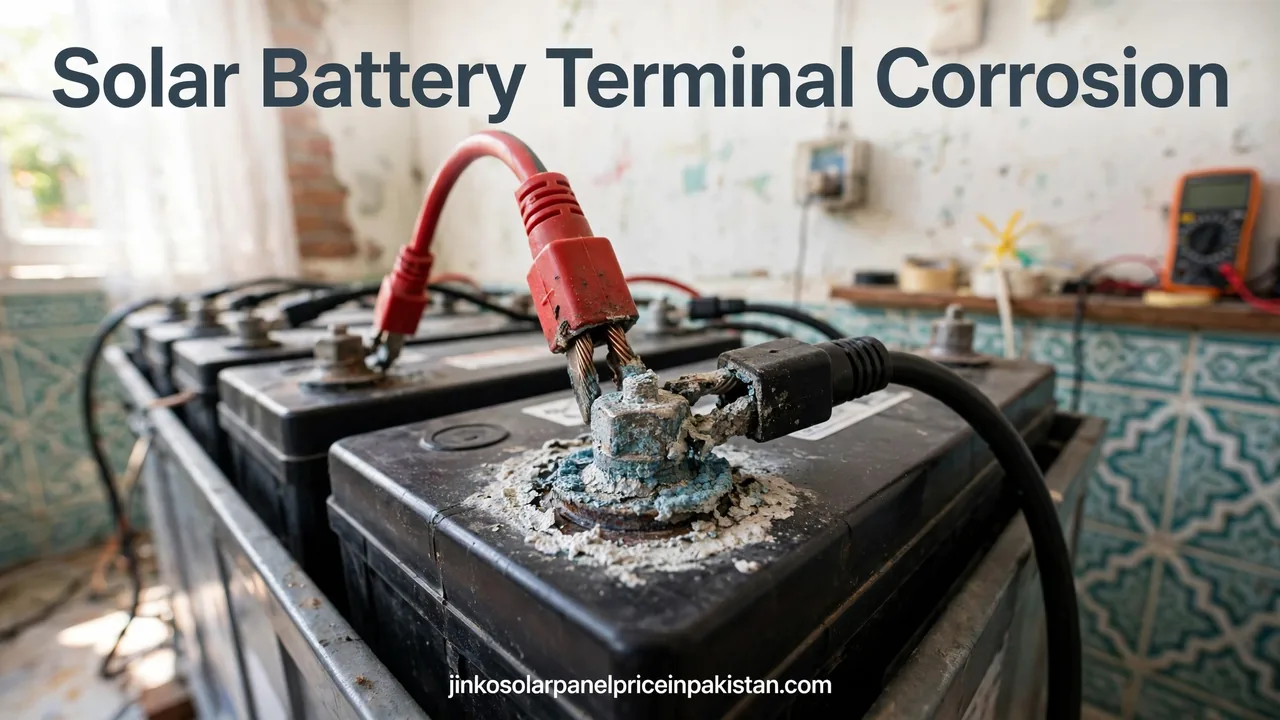
What Battery Terminal Corrosion Looks Like
Corrosion on a battery terminal usually appears as a dry, crusty deposit around the base of the terminal post and inside the cable clamp. On the positive terminal it is most often white or pale blue; on the negative terminal it tends to be white or grey. In humid weather, or in a battery room with poor ventilation, the crust can grow thick enough to lift the cable clamp slightly off the post. You may also see green or blue staining on the copper strands where the cable enters the clamp, which means the corrosion has started travelling up the cable itself.
Why Solar Battery Terminals Corrode
Corrosion is a chemical reaction, and a solar battery gives it everything it needs. Flooded lead-acid batteries — the tall tubular batteries common in Pakistani homes — release tiny amounts of hydrogen gas while charging, especially near the end of the charge cycle. That gas carries traces of sulphuric acid vapour, which settles on the metal terminals and reacts with the lead and the copper of the cable. The reaction is faster in heat, and Pakistani summers give it plenty of that.
A second cause is the meeting of two different metals. The terminal post is lead, the clamp is usually a lead alloy or copper, and the cable strands are copper. Where two different metals touch in the presence of moisture and acid vapour, a small galvanic reaction eats away at the joint. This is why corrosion is often worst exactly where the clamp meets the post, and why the positive terminal — which carries the charging current — usually corrodes first and heaviest. Loose connections make it worse: a clamp that is not tight lets acid vapour and moisture creep into the joint, while over-tightening can crack the lead post. A terminal that keeps corroding within weeks of cleaning is often a loose or damaged clamp.
Overcharging also speeds corrosion up. When a battery is charged too hard or for too long, it gasses more, and more acid vapour reaches the terminals. This is one reason to keep the inverter’s charging settings matched to the battery type — our solar inverter maintenance guide covers the settings worth checking. Sealed batteries such as lithium and AGM types gas far less, so their terminals usually stay cleaner; if you are comparing battery types, our lithium battery guide for solar in Pakistan explains the difference.
What Corrosion Does to Your Solar System
The first thing corrosion does is add resistance between the battery and the inverter. Resistance turns power into heat, so some of the energy that should reach your home is lost warming up the terminal instead. The practical effect is shorter backup: the inverter shuts down on low voltage earlier than it should, because the voltage it measures at its end of the cable is lower than the voltage inside the battery. Many homeowners blame the battery for weak backup when the battery is fine and the terminals are the problem. It also slows charging, so the battery may never reach full charge — our solar battery lifespan guide explains how that shortens battery life.
Finally, corrosion makes fault-finding harder: backup that varies from day to day, or an inverter that throws a low-battery warning on a battery that tests fine, often means a corroded terminal somewhere in the chain. Checking the terminals belongs on the regular list in our solar system maintenance checklist.
How to Clean Battery Terminals Safely, Step by Step
Cleaning battery terminals is safe for a homeowner, but only if the order is respected. Batteries store a large amount of energy, and a short circuit across the terminals can melt a spanner in seconds. Work slowly, keep metal tools away from both terminals at once, and never work on a battery while the inverter is running.

What you need: rubber gloves, safety glasses, a terminal wrench or spanner, an old toothbrush and a wire brush (a battery terminal brush is ideal), baking soda, a small plastic container, clean water in a spray bottle or jug, a dry cloth and a little petroleum jelly.
Step 1 — Switch everything off. Turn the inverter off at its switch, and switch off the solar charge controller or the DC breaker feeding the battery if your system has one. The battery should be completely out of the circuit before you touch a cable.
Step 2 — Disconnect the negative cable first. Loosen the nut on the negative (black) cable clamp and lift the cable off the post. Tuck it aside so it cannot spring back, then do the same with the positive (red) cable. Negative first, positive second — this order means a slipped spanner cannot short the battery.
Step 3 — Mix the cleaning solution. Stir about one tablespoon of baking soda into a cup of warm water. Baking soda is a mild alkali, so it neutralises the acidic corrosion on contact — you will see it fizz where it touches the crust. For heavy corrosion, make a thick paste instead: a couple of tablespoons of baking soda with just enough water.
Step 4 — Apply and scrub. Brush or pour the solution over the terminals, the clamps and the cable ends, and let it fizz for a few minutes. Then scrub with the wire brush until the post and the inside of the clamp are bright, dull-grey lead, using the toothbrush for the bolt, nut and cable strands. Keep going until no white or blue residue remains — a half-cleaned terminal corrodes again quickly because the leftover deposit seeds the next round.
Step 5 — Rinse and dry completely. Rinse with a small amount of clean water — a spray bottle or a damp cloth is enough; do not hose the battery down, and keep water out of the vent caps on a flooded battery. Dry everything with a clean cloth and leave the terminals open to the air for a few minutes. Any moisture left inside the clamp becomes the start of the next corrosion.
Step 6 — Reconnect, positive first. Put the positive (red) cable back on first, then the negative (black), and tighten each clamp until it is snug, then add about a quarter turn more. The clamp should not twist on the post when you try to turn it by hand. Do not over-tighten — a cracked lead post is worse than a slightly loose clamp.
Step 7 — Protect the clean metal. Smear a thin layer of petroleum jelly over the post, the clamp and the bolt. It keeps air and acid vapour away from the bare metal and slows the next round of corrosion. Terminal protector spray does the same job. Switch the inverter back on and check that the system charges and discharges normally.
YourMechanic’s guide to cleaning battery connections walks through the same steps, and their photos show exactly what a properly cleaned terminal should look like.
How to Stop Corrosion Coming Back
Cleaning fixes the symptom; prevention fixes the cause. The single most effective habit is a monthly look at the terminals. Catching a thin white film early means a two-minute wipe instead of a full cleaning job, and a monthly check is already part of our solar battery maintenance guide. Add the terminal check to the same visit when you top up the water in a tubular battery — our tubular battery water maintenance guide covers that routine.
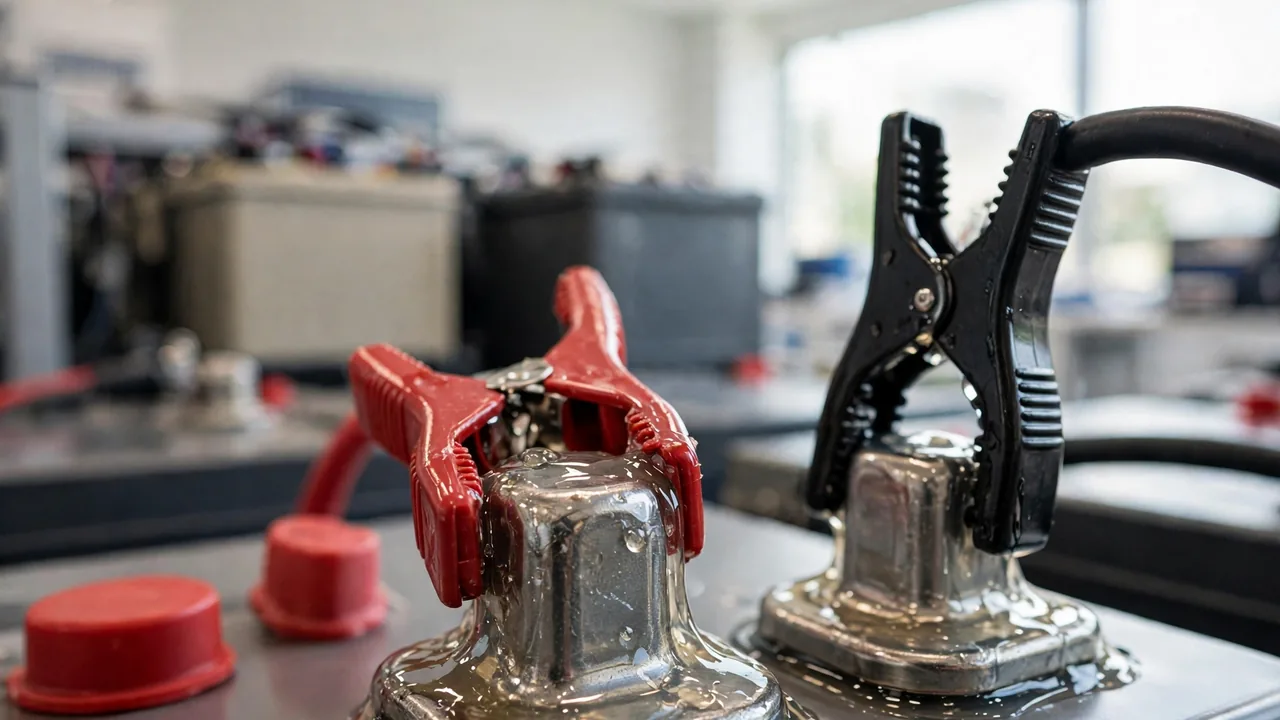
Keep the battery top clean and dry. Dust and spilled electrolyte hold moisture against the terminals, so wipe the battery top with a dry cloth whenever you check the water levels. Keep the battery room ventilated — a small exhaust fan or even a vent near the ceiling lets hydrogen gas escape instead of settling on the terminals. In the hot season this matters more, because heat speeds the reaction. Fit felt terminal washers if your supplier stocks them: rings soaked in a corrosion inhibitor that sit under the clamp and block acid vapour. They are cheap and last for months. Terminal protector spray does the same job in liquid form.
Check the charging settings once a season: overcharging gasses more and corrodes faster. If corrosion keeps returning within weeks of cleaning despite tight, coated terminals, ask your installer to check the charging voltage — it is a settings problem, not a cleaning problem. Finally, give each clamp a gentle twist by hand during the monthly check; if it turns on the post, tighten it, and if it will not tighten further, the clamp is worn and should be replaced.
When Cleaning Is Not Enough
Some terminals are past cleaning. If the corrosion has travelled inside the cable — green or blue staining on the copper strands a few centimetres from the clamp, or a cable that feels stiff and brittle — cleaning the outside will not restore the connection. The cable needs to be cut back to clean copper or replaced entirely, which is a job for an installer because the cable carries the full battery current.
Replace rather than clean when the terminal post is eaten away, pitted or cracked, when the clamp is deformed and will not grip firmly, or when the plastic case around the terminal is melted or swollen. A battery that corrodes its terminals again within days of a proper cleaning may have an internal fault — a leaking seal around the post lets acid vapour escape constantly. Our signs your solar battery needs replacement guide helps you tell a terminal problem from a battery at the end of its life.
Call a professional immediately if a terminal is hot to the touch, you smell burning near the battery, or the battery case is swollen or leaking — switch the inverter off and call your installer. If you want to avoid this maintenance altogether, our best battery for solar system in Pakistan guide compares the types, including sealed options whose terminals stay clean for far longer.
Frequently Asked Questions (FAQs)
What causes white powder on solar battery terminals?
A white, blue or green crust on the terminals is caused by acid vapour escaping from the battery during charging. The vapour reacts with the lead post and the copper cable, and heat and humidity speed the reaction up. Loose clamps and overcharging make it worse.
Can I clean my solar battery terminals myself?
Yes, if you follow the safety order: switch the inverter off, disconnect the negative cable first, then the positive, clean with a baking soda and water solution, rinse, dry completely, reconnect positive first, and coat the terminals with petroleum jelly. Never work on a battery while the inverter is running.
What is the best way to clean corroded battery terminals?
Mix about one tablespoon of baking soda into a cup of warm water, apply it to the terminals and clamps, let it fizz for a few minutes, then scrub with a wire brush until the metal is bright grey lead. Rinse lightly, dry completely, and finish with a thin coat of petroleum jelly.
Should I disconnect the battery before cleaning the terminals?
Yes. Always switch the inverter off and disconnect the cables before cleaning — negative first, then positive. Cleaning a terminal while it is still connected risks a short circuit and gives you a poor result, because you cannot clean the inside of the clamp properly while it is on the post.
How often should I check my solar battery terminals?
Look at the terminals once a month, and clean them whenever you see a white or blue crust forming. In the hot season, or in a poorly ventilated battery room, check more often — heat and humidity speed corrosion up.
Does terminal corrosion reduce backup time?
Yes. Corrosion adds resistance between the battery and the inverter, so some energy is lost as heat at the terminal and the inverter sees a lower voltage than the battery actually holds. The result is shorter backup, even though the battery itself is healthy.
Can I use petroleum jelly on battery terminals?
Yes. A thin layer of petroleum jelly over the clean post, clamp and bolt keeps air and acid vapour away from the bare metal and slows the next round of corrosion. Terminal protector spray does the same job.
When should I replace a corroded terminal or cable instead of cleaning it?
Replace the cable or terminal when the corrosion has travelled inside the cable, the terminal post is eaten away, pitted or cracked, the clamp will not grip firmly, or the plastic case around the terminal is melted or swollen. Corrosion that returns within days of a proper cleaning can mean an internal battery fault — call your installer.